Issue #189 (The Ultimate Agent Mode Tutorial)12/03/25
All Newsletter, No Noise
We hear constant complaints from readers about their inbox chaos and the inability to find the newsletters they’re actually looking for, including ours. Recently, we were introduced to Khaki, a free app that solves for this.
|
It strips away all the unnecessary content and features, so you can enjoy reading the content you’re subscribed to without distractions, to create the ultimate reading experience.
|
|
Autosave is an interesting app feature that can be both good and bad, depending on the context. I certainly like autosave on apps like Google Docs or Sheets, especially when it's easy to revert any changes.
But what about autosave when writing code in your IDE? Again, it depends on the context. To that end, VS Code allows you to define custom autosave settings depending on what you're working on.
For example:
|
{
"[javascript]": {
"files.autoSave": "afterDelay"
}
}
|
In a case like the above example, your default autosave setting might be "off" but maybe you want VS Code to autosave only for a specific language (in this case JavaScript).
You might also want to take advantage of the other autosave values, depending on the project being worked on:
|
{
"[html]": {
"files.autoSave": "onFocusChange"
}
}
|
This only autosaves HTML files when they're edited and the editor loses focus.
Similarly:
|
{
"[css]": {
"files.autoSave": "onWindowChange"
}
}
|
The above will autosave CSS files when they're edited and the window loses focus. This assumes you have different VS Code windows open or you are switching to a non-VS Code window for whatever reason.
If you're like me, you probably won't enable autosave for anything but if you think it might be helpful in a specific context, the above code snippets in your JSON settings (you can only do this via JSON) might be helpful.
Now on to this week's hand-picked links!
|
|
|
VS Code Tools
|
oklchanger — A VS Code extension that converts color definitions in selected text to the OKLCH color format, with support for named colors, hex, RGB, RGBA, HSL, HSLA, Lab, and LCH color models.
vscode-gitui — A VS Code extension to open GitUI and Lazygit in an integrated terminal. Requires both tools to be installed and available on your PATH variable.
37 Freaking Awesome Gadgets — This collection of must-have gadgets delivers clever, useful tech that DOES something... no fluff, no gimmicks. The best gadgets aren’t just cool... they solve real everyday problems. Want cool tech that actually works? See the list before everything disappears. Sponsor
Contextive — A VS Code extension to assist developers in environments with complex project-specific language, to help new team members get up to speed on specific terms and definitions.
|
VS Code Theme of the Week
|
MS-DOS Theme — A VS Code theme for people who miss using the old MS-DOS. At first glance, it's an awful theme, but I have to say that the syntax highlighting for the code isn't too bad on the eyes and is easy to understand.
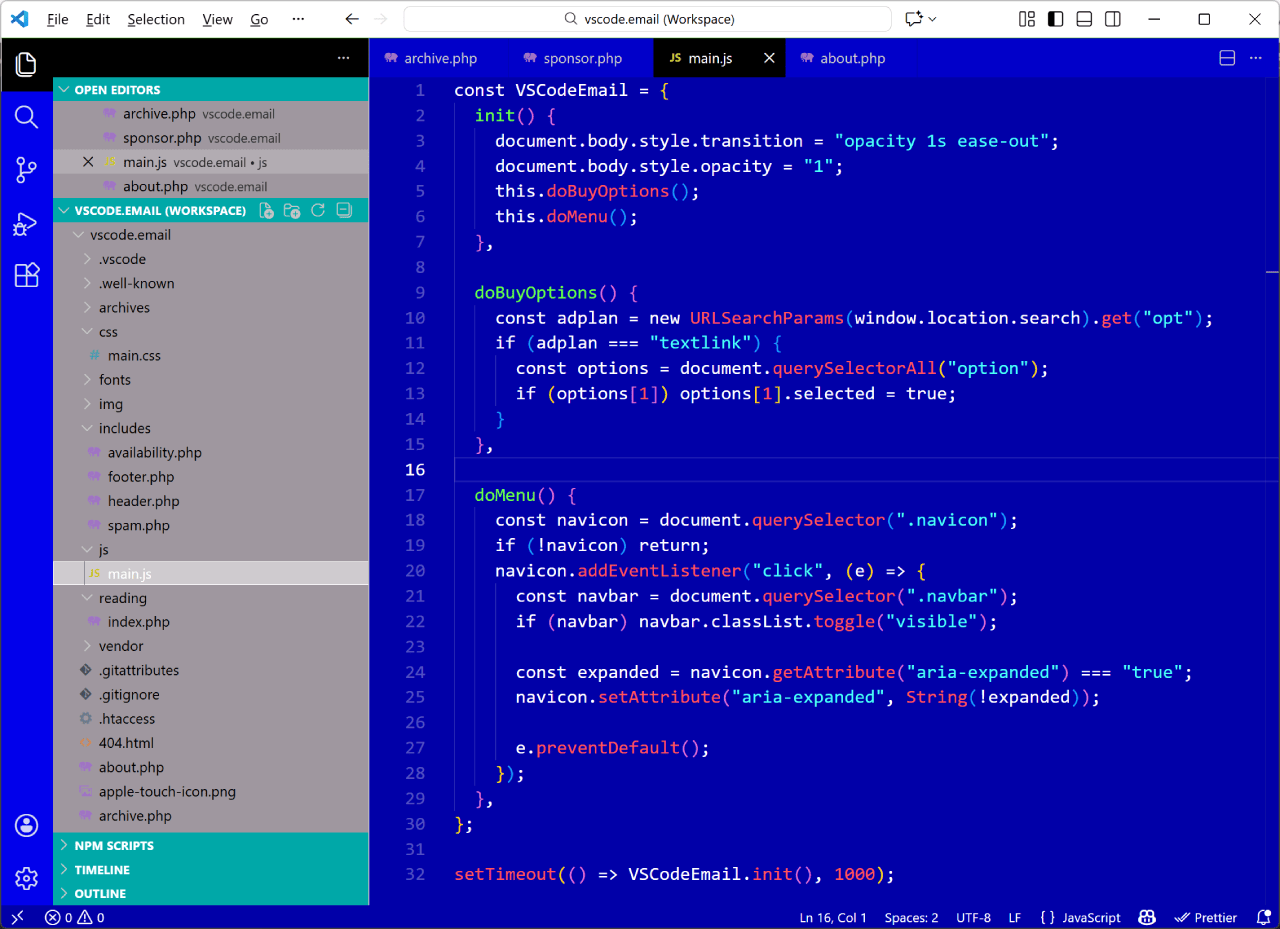
I'm not so sure about the sidebar color choice (see last week's issue for a quick fix!) but I do enjoy the occasional unique or retro-styled theme. So if you like this sort of thing and want to reminisce, well here you go. But don't say I didn't warn you!
|
|
|
|
|
VS Code Articles & Videos
|
📺 The Ultimate Agent Mode Tutorial in VS Code: Vision, MCP, Custom Agents & More — A video tutorial to budget and learn finance in VS Code with Agent Mode, that goes from spreadsheet to working app to GitHub issues in minutes.
Ransomvibing Appears in VS Code Extensions — One engineer's breakdown of the code used in a recent ransomware VS Code extension.
Tech Newsletters You'll Love — If you want the latest news and tools on programming, Web3, AI, team leads, automation, and more, you might want to check out some of these free newsletters. Sponsor
I Love It When A Plan Comes Together — The title is a reference to the old A-Team TV show and the post is a look at a new GitHub Copilot feature called Planning Mode, which extends its Agent Mode capabilities.
|
|
|
Best of the Rest
|
Myna — A monospace font which aims to bring harmony to your editor by treating symbols as first-class glyphs alongside alphanumeric characters.
Visual Studio 2026 Is Here: Faster, Smarter, And A Hit With Early Adopters — This update to the classic Visual Studio fixes over 5,000 reported bugs and implements 300 feature requests, the most they've ever done.
Brain Food, Delivered Daily — Every day the folks at Refind analyze thousands of articles and send you only the best, tailored to your interests. Loved by 551,675 curious minds. Sponsor
SQL Online IDE — A browser-based playground for testing and learning SQL queries, with support for SQLite, DuckDB, PGLite, MariaDB, MySQL, PostgreSQL, MS SQL Server, and AI error analysis.
If you have any link suggestions, including a tool, article, or other resource related to VS Code or another IDE, you can hit reply, send it via DM on X, or via chat on Bluesky.
That's it for this issue.
Happy VS Coding!
Louis
VSCode.Email
@LouisLazaris
|
|
|