Issue #196 (Inline Suggest Settings)01/21/26
|
|
Refind allows you to select the topics that mean the most to you, so you can stay on top of the news in your niche. Many find it to be a productivity game changer for them and a fundamental part of their news reading routine.
|
|
Depending on your workflow and preferences, you may want to customize how GitHub Copilot provides inline suggestions.
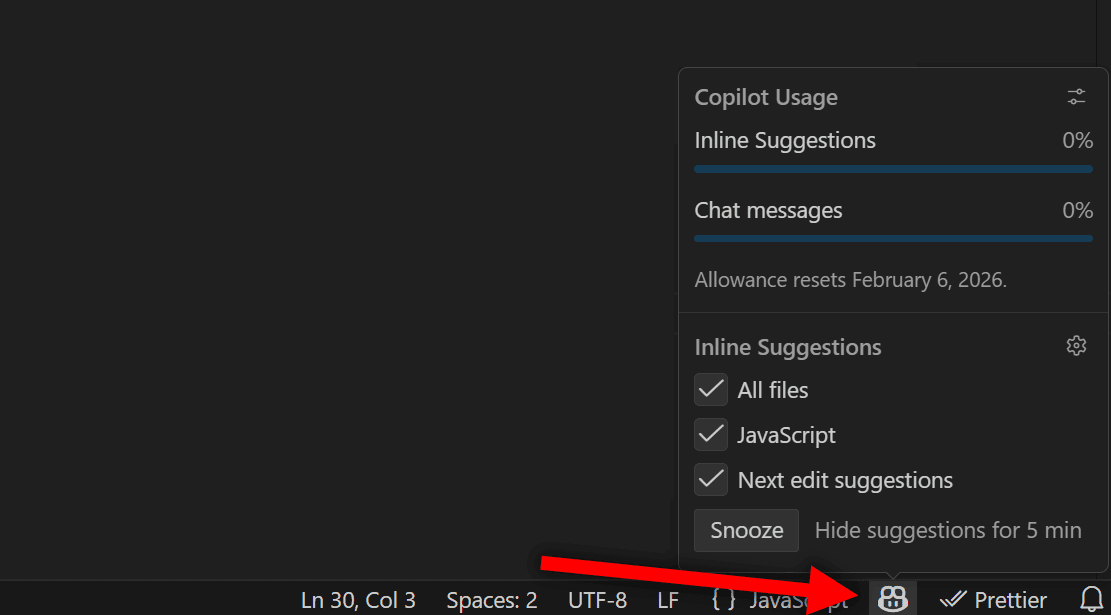
Firstly, you may have already noticed there's a little Copilot icon in your status bar in VS Code that you can hover over or click to view options related to inline suggestions.
The menu that appears gives you some basic data, a link to manage your chat settings on GitHub (the icon next to "Copilot Usage"), and some quick settings for Inline Suggestions.
You can check or uncheck which files you want inline suggestions to be applied, which basically is a list of your open file types. If you want to expand on what files and languages offer inline suggestions, click the little cog icon next to "Inline Suggestions". This brings up the GitHub > Copilot: Enable setting.
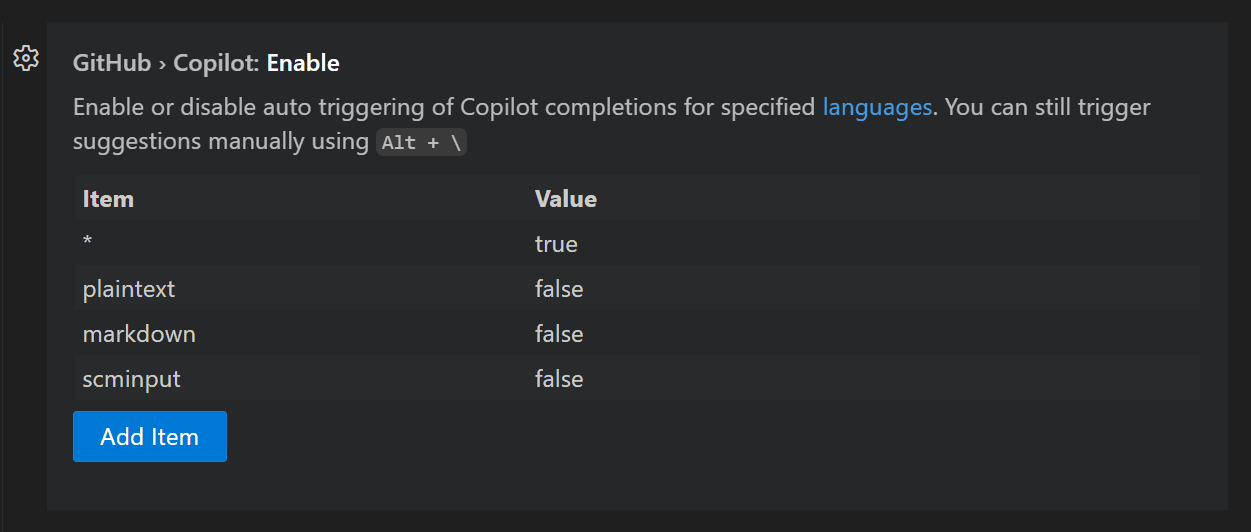 |
You'll notice by default three languages are set to "false" and there's a wildcard character that indicates that all other files will have inline suggestions. This essentially sets your inline suggests to 'opt-out' mode, meaning you have to opt out of any you don't want.
And you'll also notice there's a "Snooze" button in this menu, which allows you to temporarily stop inline suggestions for 5 minutes.
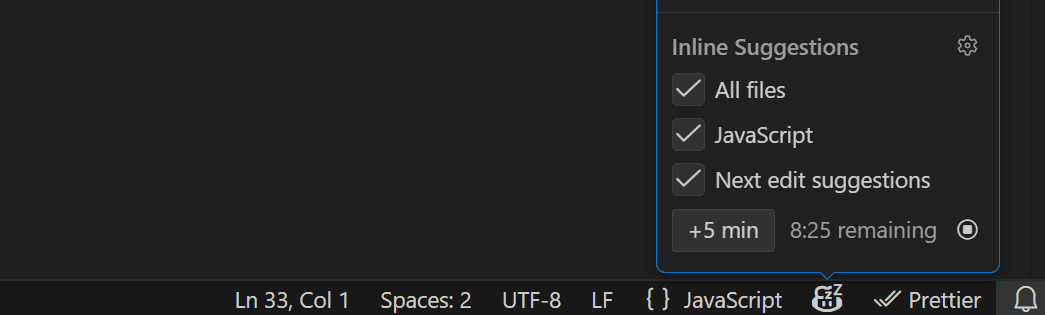
You can then click the "+5 min" button to increase the duration of the snooze. Then, at any time you can click the "Cancel snooze" icon that appears on the right. And usefully you'll see a little "zz" indicator on the Copilot icon to show that you're still currently snoozing inline suggestions.
Now on to this week's hand-picked links!
|
|
|
VS Code Tools
|
opencode — A Visual Studio Code extension that integrates opencode (the popular open source AI coding agent) directly into your development workflow.
Kilo Code — An all-in-one agentic engineering platform, available for VS Code, JetBrains, and other IDEs, with features like cloud agents, code reviews, one-click deployment, parallel agents, and more.
A New Place To Read Your Newsletters — We’re trying out a free app for reading newsletters called Khaki. The interface is clean, distraction-free, and only shows the newsletters you're subscribed to, no noise of everything else in your usual inbox. Sponsor
DotCommand — A VS Code extension to save, view, copy, and manage your frequently used commands in VS Code. The extension understands your project context, suggests relevant commands automatically, and provides framework-specific development workflows.
|
VS Code Theme of the Week
|
Desert — This is a port of a Vim theme of the same name that the author claims was one of the most popular dark themes for Vim.
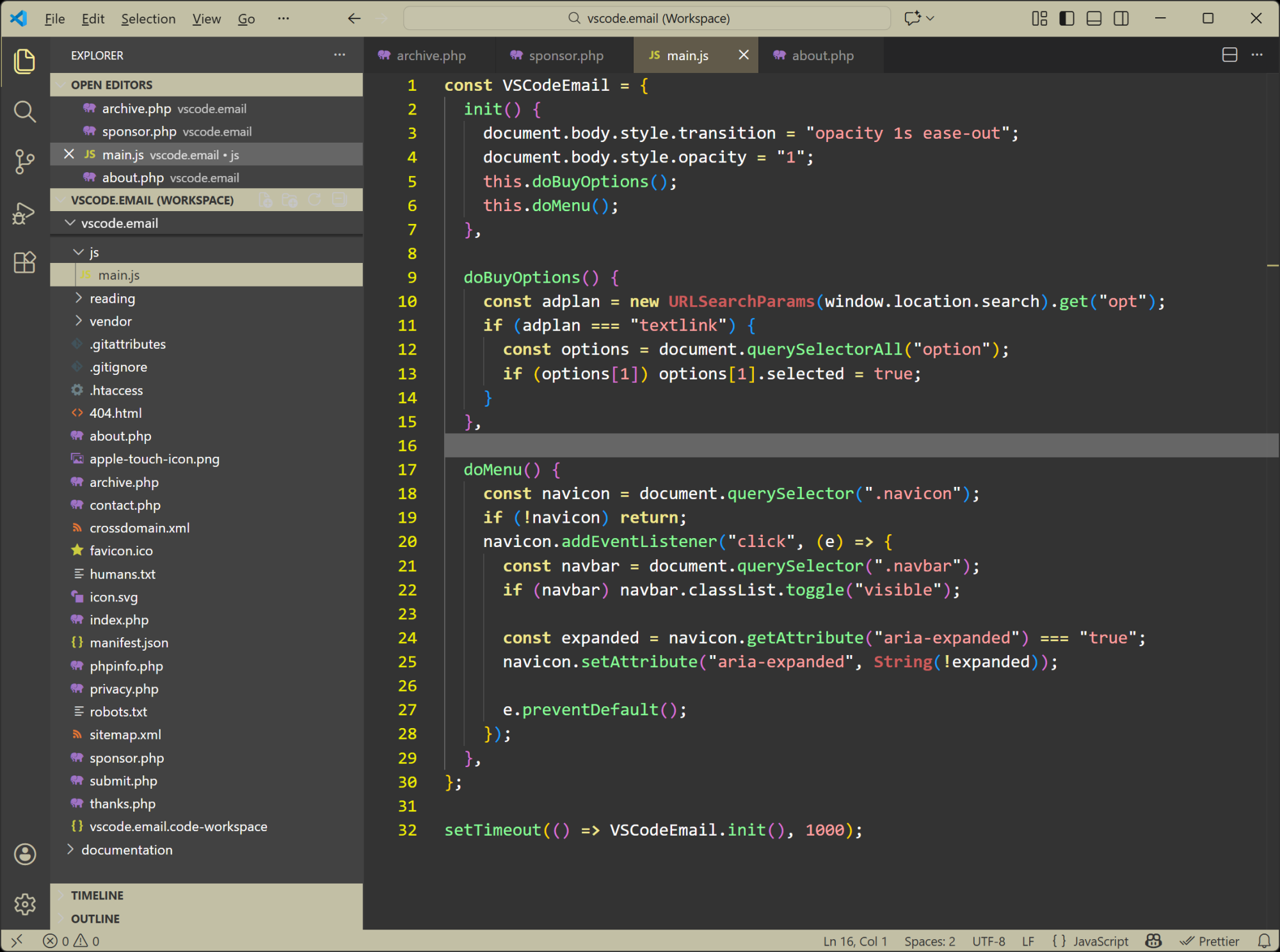
According to the description, the old theme was "known for its gentle contrast, readable comments, and earth-toned palette that worked well across terminals and GUI Vim", and this theme attempts to recreate that. Looks nice and unique and it has a slightly modified alternate version with "no bold".
|
|
|
|
|
VS Code Articles & Videos
|
Building docfind: Fast Client-Side Search with Rust and WebAssembly — The VS Code team introduces a new search experience for the VS Code website, powered by a Rust-based search engine that runs entirely in the browser.
History of Extensions Removed from VS Marketplace — A resource on the VS Code Marketplace issue tracker (which I didn't know existed until now). This is a document that lists all extensions that have been removed due to malware or other security issues.
Techpresso — A free daily email with the most interesting tech news and insights, read by 500,000+ professionals from Google, Apple, OpenAI, and more. It's the best way to stay ahead in just a few minutes. Sponsor
Use Claude Code in VS Code — Info from the Claude Code docs on using the Claude Code VS Code extension, which is now generally available, as was just announced on X.
|
|
|
Best of the Rest
|
webR — An online playground that lets you run and experiment with using the R programming language directly in the browser in a JSFiddle-like environment.
Breaking Down JetBrains’ Complex AI Agent Strategy — "Having built its reputation on developer-friendly tools, JetBrains faces the challenge of proving it can navigate the AI era without alienating the community that made it successful."
Brain Food, Delivered Daily — Every day the folks at Refind analyze thousands of articles and send you only the best, tailored to your interests. Loved by 550,000+ curious minds. Sponsor
Why the Future of Software Engineering is Beyond the IDE — The author believes the move beyond the IDE is one of many changes we'll see in software development in the next few years, including the current trend towards AI-powered development.
If you have any link suggestions, including a tool, article, or other resource related to VS Code or another IDE, you can hit reply, send it via DM on X, or via chat on Bluesky.
That's it for this issue.
Happy VS Coding!
Louis
VSCode.Email
@LouisLazaris
|
|
|