Issue #197 (Disallowed Nullish and Truthy Checks)01/28/26
|
|
Refind allows you to select the topics that mean the most to you, so you can stay on top of the news in your niche. Many find it to be a productivity game changer for them and a fundamental part of their news reading routine.
|
|
If you're a TypeScript user, since version 5.6, TypeScript now helps you find poorly-written code examples by disallowing specific nullish and truthy checks.
Due to the prevalence of AI coding, this might be of minimal help now, but if you're still writing code by hand or you just want to continue having a better understanding of your code, you'll like this feature. And of course, this is fully supported in VS Code, which I'll demonstrate.
The VS Code release notes explained this problem as follows:
"TypeScript now reports some of the most common 'always true' errors in your program. This includes testing an if conditional against a value that is never value, or a conditional expression where the one side is unreachable, such as /abc/ ?? /xyz/."
Here's one example where you might accidentally write arrow function syntax instead of using >=:
|
if (x => 0) {
// Do something here...
}
|
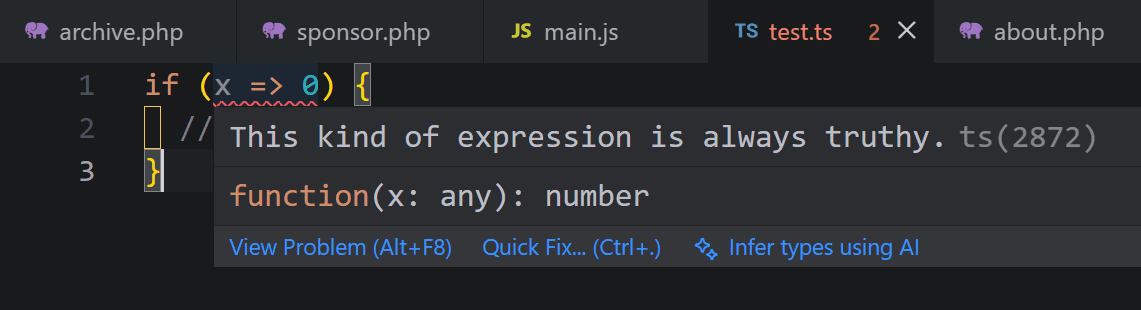
The above isn't technically an 'error' so you might not have seen any warning in your tools on this one before. Within VS Code, however, you'll see a clear warning as shown in the screenshot below.
The warning appears in the tab, in my VS Code status bar, and within the code itself. As shown above, hovering over the "error" gives you the 'always truthy' warning.
In this case, even AI might not be able to figure out how to fix the problem, because it's literally just a human error where the characters were typed incorrectly. You can review more examples of this sort of thing in the TypeScript 5.6 release notes.
Now on to this week's hand-picked links!
|
|
|
VS Code Tools
|
Better SVG — A multi-featured VS Code extension that allows you to preview your SVGs, access a color picker, use zoom/pan controls, and take advantage of built-in SVGO support for optimizing your graphics.
Nogic — A VS Code extension that enables you to visualize your codebase structure with interactive diagrams, with support for JavaScript, TypeScript, and Python.
TLDR Dev — Get smarter about software in 5 minutes. The most important software engineering news in one daily email. Join 450,000+ readers. Sponsor
GitHub Copilot App Modernization — An AI-powered agent that helps modernize applications end to end, upgrading runtimes and frameworks, migrating apps to Azure, improving security, and more. See articles below for a JS/TS intro.
|
VS Code Theme of the Week
|
IntelliJ IDEA Islands — A set of three dark and light themes inspired by a theme for IntelliJ IDEA with the same name. The one shown below is the "classic" version which has a slightly lighter sidebar.
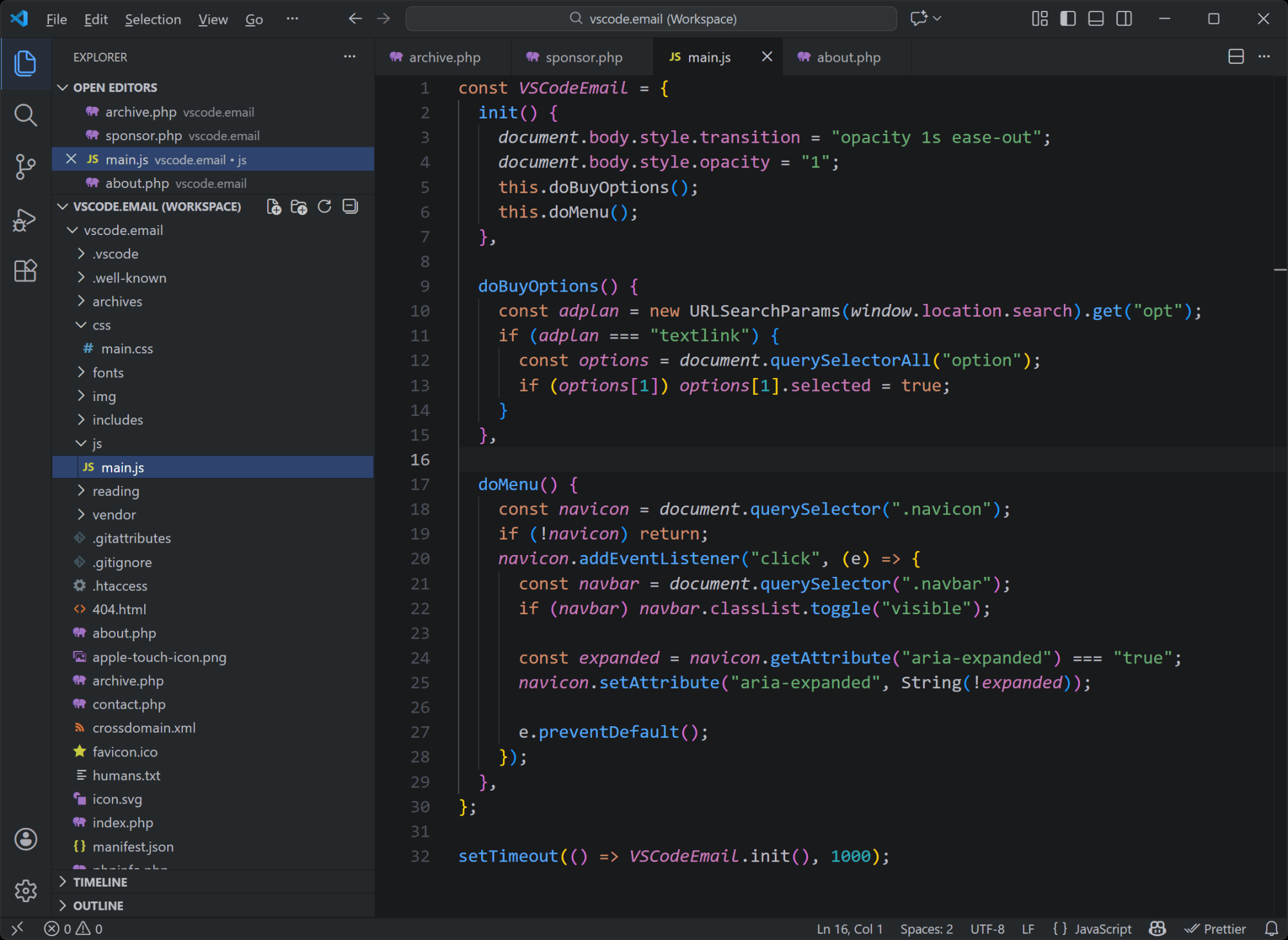
The regular dark version is the same as the above, but with the same dark background on the sidebar. It's a fairly standard looking dark theme so you might enjoy it as a secondary option to your usual dark theme. The light theme is very bright, so if you like that in a light theme, you can check that out.
|
|
|
|
|
VS Code Articles & Videos
|
Giving Agents a Visual Voice: MCP Apps Support in VS Code — A preview of an upcoming feature in the next release of VS Code, which is full support for MCP apps, the first official MCP extension.
Setting Up Your IDE for Nuxt UI: A Complete Guide — Includes some essential extensions, some configuration recommendations, and some AI tips.
Techpresso — A free daily email with the most interesting tech news and insights, read by 500,000+ professionals from Google, Apple, OpenAI, and more. It's the best way to stay ahead in just a few minutes. Sponsor
Announcing the JavaScript/TypeScript Modernizer for VS Code — Intro to the extension mentioned above, which uses GitHub Copilot under the hood to upgrade your JS/TS apps, guiding you through code updates and package upgrades step by step.
|
|
|
Best of the Rest
|
📺 Is Zed the Killer of All IDEs? — YouTube video from the DevOps Toolbox channel introducing Zed for those unfamiliar. They do disclose that the video is a sponsored post, so take their enthusiasm with a grain of salt.
Play — An online playground that's an attempt at a browser-based live-code environment with text-only output, born from the joy of ASCII, ANSI, and in text-based art.
Brain Food, Delivered Daily — Every day the folks at Refind analyze thousands of articles and send you only the best, tailored to your interests. Loved by 550,000+ curious minds. Sponsor
GraphQL IDE Monorepo — A monorepo for building simple GraphiQL IDE instance for your server, or a more advanced web or desktop GraphQL IDE experience for your framework or plugin.
If you have any link suggestions, including a tool, article, or other resource related to VS Code or another IDE, you can hit reply, send it via DM on X, or via chat on Bluesky.
That's it for this issue.
Happy VS Coding!
Louis
VSCode.Email
@LouisLazaris
|
|
|